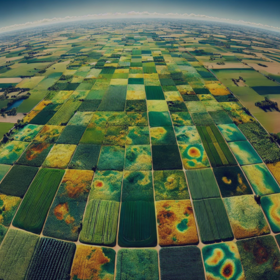
Telangana Crop Health Challenge
'%3e%3ccircle r='20' fill='%23008'/%3e%3ccircle r='17.5' fill='%23fff'/%3e%3ccircle r='3.5' fill='%23008'/%3e%3cg id='d'%3e%3cg id='c'%3e%3cg id='b'%3e%3cg id='a' fill='%23008'%3e%3ccircle r='.875' transform='rotate(7.5 -8.75 133.5)'/%3e%3cpath d='M0 17.5.6 7 0 2l-.6 5L0 17.5z'/%3e%3c/g%3e%3cuse xlink:href='%23a' transform='rotate(15)'/%3e%3c/g%3e%3cuse xlink:href='%23b' transform='rotate(30)'/%3e%3c/g%3e%3cuse xlink:href='%23c' transform='rotate(60)'/%3e%3c/g%3e%3cuse xlink:href='%23d' transform='rotate(120)'/%3e%3cuse xlink:href='%23d' transform='rotate(-120)'/%3e%3c/g%3e%3c/svg%3e)
Helping India
€6 900 EUR
Completed (over 1 year ago)
Classification
1090 joined
283 active
Start
08 Nov 24
Close
09 Feb 25
Reveal
10 Feb 25

'/%3e%3cpath fill='%23fff' d='m8.751-17.959 10.11 11.373L3.997-9.844l13.94-6.1-7.692 13.129z'/%3e%3c/svg%3e)
EarthEngineDataTrainingStaterNotebook
Notebooks · 14 Jan 2025, 10:43 · 27
https://www.kaggle.com/code/muhammadqasimshabbir/teleghanhealthearthenginedatatraining
Please If you find it helpful upvote it so that other may find it easily.
what is the score on the leaderboard?
Probably i think about 72 score on leader board
please i need urgent assistance to this
Troubleshooting info: Principal: bellokabir001@gmail.com Resource: ee-ak2024 Troubleshooting URL: console.cloud.google.com/iam-admin/troubleshooter;permissions=resourcemanager.projects.get,resourcemanager.projects.getIamPolicy;principal=bellokabir001@gmail.com;resources=%2F%2Fcloudresourcemanager.googleapis.com%2Fprojects%2Fee-ak2024,%2F%2Fcloudresourcemanager.googleapis.com%2Fprojects%2Fee-ak2024/result Missing permissions: resourcemanager.projects.get resourcemanager.projects.getIamPolicy
How did you get ur project id
make account in earth engine log in i mean then https://developers.google.com/earth-engine/guides/access flow this create project https://console.cloud.google.com/cloud-resource-manager?inv=1&invt=Abm1Jw My project id is present on this link your is also present on this link Also use your gmail not this bellokabir001@gmail.com when authencation you will see your project Id as well use this in initilzation
please sir i did not get explanation very well
First step make a account of google earth enginee
When you run a code and During authenication go to link.
During these step you will see your project id use this project id to initilzation and then run code after it you can see https://console.cloud.google.com/cloud-resource-manager?inv=1&invt=Abm6yQ on this link as well your earth enginee project id
Thanks i have gotten it
okay that s good for you
Please sir what is the essence of the google earth engine
The Essence of Google Earth Engine (GEE):
Google Earth Engine (GEE) is a cloud-based platform for processing and analyzing large-scale geospatial data. It provides access to global datasets like satellite imagery (e.g., Landsat, Sentinel) and climate data, enabling real-time environmental monitoring and analysis. Also in the notebook we download this data and use this data to train model as in given Stater notebook. you can say that i have edited the stater notebook which in this competetion is provided already. it uses Sentinel data to improve accuracy and robustness of model. I have use one model you can try different model with parametere and different technique. In the notebook first we download data and get features from this and trian and make submission.
Ok sir but am still facing challenge on running the starter notebook
FileNotFoundError: [Errno 2] No such file or directory: '/content/drive/MyDrive/EarthEngineImages/data.csv'
Here’s the corrected version of your statement:
There is no data.csv file initially available. You need to first run the code provided in this notebook: Teleghan Health Earth Engine Data Training to download the required data.
Once the data is downloaded, you can load it using:
pythonCopy codedata = pd.read_csv(data_path)You can then save the file as data.csv for future use.
Additionally, I have also saved the downloaded images . If you prefer, you can directly access the dataset I’ve already prepared here: Sentinel Time Series Data.
Feel free to upvote datasets if you find it helpful! 😊
you can use my data.csv and other sentienal files i have donwloaded already
ok sir let me give it a try
Sorry to ask, What makes the stater notebook code different from that of Kaggle
There is not much different between them aside that i have separate the part the of authentication , initialzation and Data loading etc rest of the code of is similarr to provided notebook . But you can still add it optuna study, try different model and hypertuning technique to improve your accurcracy.
correct your psth from data.csv and when pass to read file please IT is pathfile problem
Were you able to download images at different times for the same field? Or simply the the latest?
Hey i am unable to download the dataset where i can find the images ?
Here is link for it https://www.kaggle.com/muhammadqasimshabbir/datasets SentinelTimeSeriesData are the dataset in profile are these one is formatted in csv file while other is simply json like format file which is get through postman response If you find my dataset helpful please upvote them
https://www.kaggle.com/code/muhammadqasimshabbir/teleghanhealthearthenginedatatraining or you can run this notebook
the image dataset i accessed through your kaggle: https://www.kaggle.com/datasets/muhammadqasimshabbir/sentineltimeseriesdata
all the images are just black block, I tried multiple online .tif image viewer but showing the same black block for all image. Can you please help
a google drive link or something would be so helpful
https://www.kaggle.com/code/muhammadqasimshabbir/teleghanhealthearthenginedatatraining Run this notebook it will download from earthenginee directly
@ MuhammadQasimShabbeer
I am working Telangana Crop Health Challenge
I have extracted the data of sentinel satellite images into csv my doubt is that how i can concat the this sentinel data and train.csv data as we sentinel is not having the target variable but train.csv is having the target variable and i have observed that in the train.csv the records and the sentinel data csv the data points I mean the farm id are common how i can use this sentinel data